Live karaoke and open-mic event platform
Your Stage.
Your Song.
k5e is a live event management platform for karaoke and open-mic shows. The k5e Spot mobile app lets performers join the queue from their phone and know exactly when they're up; the k5e Cue web dashboard runs the host's show.
Join the WaitlistBy joining the waitlist you agree to our Privacy Policy and Terms of Service.
How It Works
Two perspectives. One seamless experience.
For Hosts & DJs
k5e Cue

- 1
Create an event
Set a name, venue, and time. Add your logo and colors. Generate a join link and QR code to share with your crowd.
- 2
Go live
Open the event and start taking requests. The queue builds itself as performers join from their phones.
- 3
Run the show
Drag to reorder, set the current act, skip, or remove entries. The display screen on your projector updates in real time.
- 4
Review the night
When the event ends, see how many acts went on, who performed the most, and how long the queue peaked.
For Performers
k5e Spot
- 1
Scan or tap
Scan the QR code at the venue or tap the link the host shared. No app to download — it opens right in your browser.
- 2
Pick a name
Choose a display name for the night. It shows up in the queue so the host knows who's performing.
- 3
Make a request
Search the catalog and submit your request. You can queue up multiple entries while the event is running.
- 4
Watch your spot
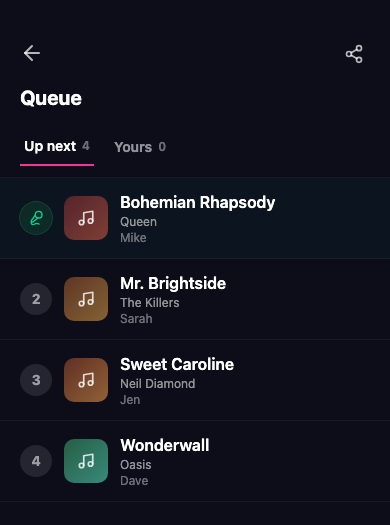
See the live queue and your position in it. You'll know exactly when you're up — no more hovering by the stage.
Everything you need to run a great night
No paper slips. No spreadsheets. No shouting over the music.
Live Queue Management
Drag, drop, promote, or skip — the host controls every entry in real time. Set the current act, complete it with one tap, and the rotation updates automatically.
Instant QR Join
Performers scan a QR code or tap a link to join — no app download, no account required. Pick a display name and you're in the queue in seconds.
Catalog Search
Performers search by title or artist before submitting. Results pull from a live catalog so the request form fills itself — no more misspelled entries.
Smart Rotation
k5e's rotation algorithm ensures everyone gets a fair turn. Multiple requests per performer are spread out automatically — no manual juggling required.
Display Mode
Open a second browser window on any screen or projector. It shows who's currently performing, who's up next, and a QR code for latecomers — branded with your event's colors.
Custom Branding
Add your logo, a background image, and your color scheme. Every screen performers see — from the join page to the queue — reflects your venue's identity.
Be the first to know
k5e is in active development. Sign up for early access and we'll reach out when the doors open.
Join the WaitlistBy joining the waitlist you agree to our Privacy Policy and Terms of Service.
Common questions
What is k5e?
k5e is an entertainment event management platform. Hosts use a dashboard to run live events and manage the performance queue. Performers join from their phones, request their spot, and see their place in the queue in real time — no app download needed.
How do performers join an event?
The host shares a QR code or a link. Performers scan or tap, sign in to their k5e account (or create one in seconds with Google, Apple, or email), pick a display name, and they’re in. It runs in any mobile browser — no app install.
How do I sign in to k5e?
Create a k5e account with your email, or use Sign in with Google or Sign in with Apple. When you choose Google, k5e receives your name and email address to create and identify your account — nothing more. k5e never posts to your account and does not access any other Google data.
When is k5e launching?
We’re in active development. Sign up for the waitlist and you’ll be among the first to get access when we open the doors.
What devices does it work on?
The performer app is optimized for mobile phones — iOS Safari and Android Chrome. The host dashboard works on desktop and tablet. Any modern browser is supported.
How much does it cost?
Pricing details are still being worked out. Sign up for the waitlist to stay in the loop.